Easier to Change (ETC)
In all my years of programming, I can’t remember a single system we built that never changed. Maybe one exists somewhere, but I can't remember it.
If software never changed, there would be very little reason to care about clean, readable, well-structured code. But that’s not the world we live in.
Every system we build changes. We fix bugs. We add features. Requirements shift. Filters change. Frameworks get updates. Edge cases show up. Sometimes the change is small, sometimes it’s significant—but change is always coming.
There are a lot of coding principles out there. A lot of opinions about the “right” way to write software. But when you strip it all down, almost all of them point to the same underlying goal: making future change easier.
David Thomas and Andrew Hunt say it best in their seminal book The Pragmatic Programmer. They write:
As far as we can tell, every design principle out there is a special case of ETC.
ETC stands for "Easier to Change".
How to Practice ETC
So how does this apply in real life?
First, it’s important to understand that ETC is a value, not a rule. Values guide decisions. They aren’t followed blindly or applied the same way in every situation, but they do inform the choices you make.
Let's look at a few examples of ETC in action.
Example 1: Balancing Customer Needs with ETC
Which is easier: building a car with no rear wiper at all, or building one where the rear wiper can be replaced?
From a pure simplicity standpoint, not having a rear wiper is easier. There’s nothing to break and nothing to maintain. The car is cheaper to design and build without a rear wiper. But customers want rear wipers, so removing it isn’t an option.
Once you accept that the system needs to exist, ETC changes the question. The question becomes: how do we make this as easy to change as possible?
That’s where decisions like using a standard wiper size come in. The wiper still exists, but replacing it is simple and cheap, and the design choice doesn't force you to "reinvent the wiper". The choice supports change instead of fighting it.
That’s ETC in practice.
Example 2: ETC in System Architecture
Sometimes ETC shows up in places that don't involve any code at all. Consider this example implemented with a no-code platform.
We have a database with two tables: Projects and Subtasks. A no-code UI is used to display and interact with the data.
On the Project detail page, we have an "Expedite" button that lets a user mark a project as expedited and attach a document detailing the expedited timeline.
Now someone asks for a “small improvement” to the user experience: add the expedited workflow to the SUBTASK side too. That means the Subtask detail page would have its own “Expedite” button and attachment upload, and an automation would copy that data up to the Project.
That sounds nice because it saves the user a step. Without the Subtask-side workflow, the flow is:
- Open Subtask details
- Find and open the linked Project details
- Click “Expedite” and attach the document
With the Subtask-side workflow, the flow is:
- Open Subtask details
- Click “Expedite” and attach the document
So the UX improvement is basically one fewer click. Sounds great!
But, the development cost is not that simple. To support the Subtask-side expedited process, we’d have to introduce:
- New
isExpeditedandexpeditedConfirmationDocfields in the Subtask table - New Expedite button on the subtask details page
- An automation that watches for and copies expedited data from the subtask record to the project record
- Support for new edge cases - what if a project has already been expedited and the user clicks the "Expedite" button on subtasks?
The most impactful side-effects are that we end up with tight coupling between the Subtask and Project schema, and several new points of failure.
Tight Coupling is when one component of software is highly dependent on another. In this case, the Subtask table schema is now tightly coupled to the Project table schema. If we change the field name or intent of expedited fields in the Project table, we should also be changing fields in the Subtask table to match. We dive deeper into the concept of coupling below.
And that’s the ETC moment: we’re trading a small UX improvement (one fewer click) for a much more complex implementation. The Subtask-side version is harder to change because it spreads one concept (“expedited”) across two tables, two UIs, and an automation. Any future change—new rules, new validations, new steps, new edge cases—now has to be made in multiple places.
When you weigh the minimal time saved for the user against the development and maintenance cost of this approach, the decision becomes really clear.
ETC tells us to keep the workflow in one place, and require the user to make the extra click.
- One source of truth for “expedited”
- One UI to maintain
- No automation to debug
- No tight coupling between table schemas
In this case, the ETC-friendly choice is to accept the extra click and keep the system simpler, because simplicity is what keeps future change cheap.
To be fair, in a full-stack developed application, it would be very easy to implement this button without all the extra automations. However, the example given is a real-world scenario that we have encountered. The important thing to take away here is to think critically about the impact of adding features, and how we architect our systems.
Example 3: ETC in 3D Modeling
ETC can be applied to many areas outside of software development. Consider this example for 3D modeling.
When creating models in 3D modeling software, you model individual parts, and then combine those parts into assemblies. Inside an assembly, relationships between parts are defined using constraints. A constraint describes how two parts are connected and what degrees of freedom are allowed—what can move, rotate, or slide, and what cannot. Constraints generally accept one entity from each part being connected, with an entity being something like a face or axis of the part.
A common example is assembling a bolt and a plate that has a hole in it. The bottom face of the bolt head is constrained to the face of the plate, and the center axis of the bolt shaft is constrained to the center axis of the hole. This fully locates the bolt in the hole while still allowing it to have one degree of freedom: rotation around its axis.
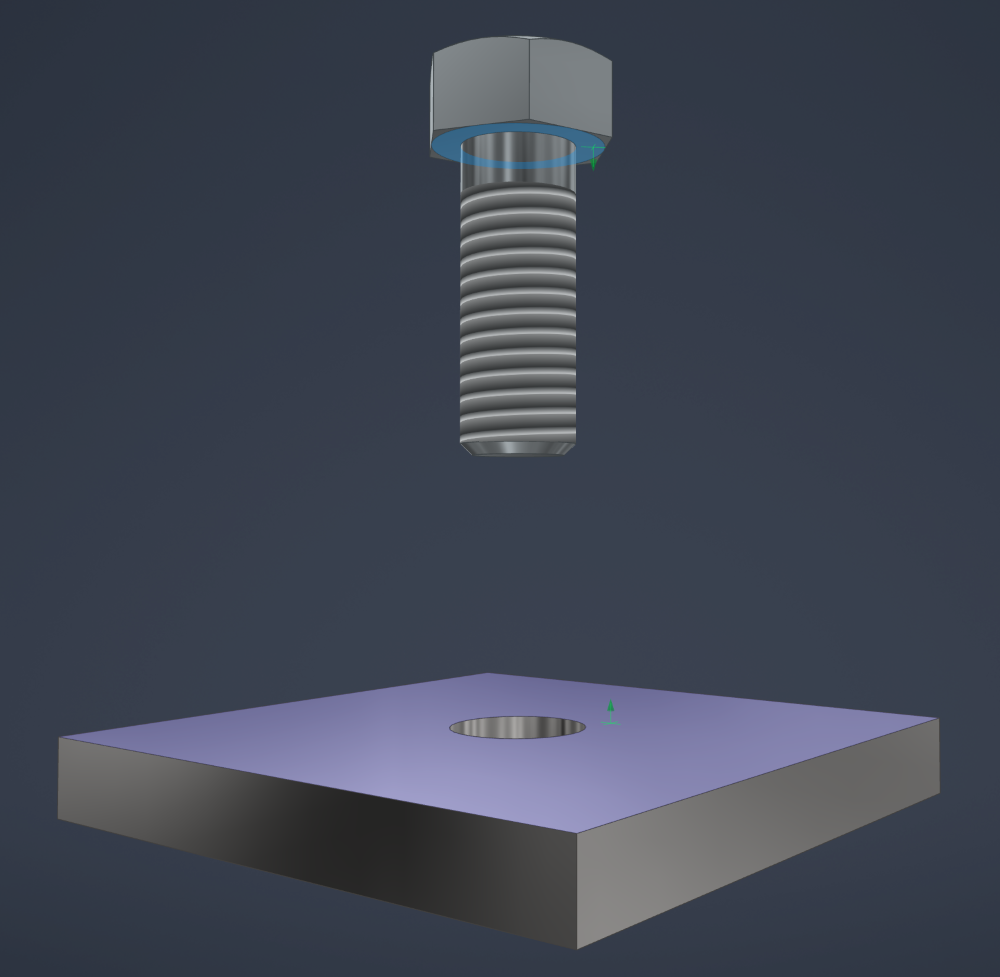
Under the hood, the software tracks these constraints by referencing specific entities, such as faces, planes, axes, etc. In simple terms, the constraint is stored as a relationship between this face and that face. Each entity in the model has its own internal entity ID, which the software uses to know exactly what geometry the constraint is attached to.
This is where change becomes a problem.
If the design of the plate changes, the face you originally constrained the bolt to may be deleted and recreated. Even if the new face looks identical - same shape, same size, same location - it is not the same exact entity. It has a new entity ID. From the software’s perspective, the original entity no longer exists.
When that happens, the constraint breaks, because one side of the face-to-face relationship is gone. CAD users like to call this a "blown up" constraint.
To avoid this, experienced modelers avoid using modeled faces for constraints. Instead, they use more stable reference geometry, such as work planes or axes. Work planes are defined separately in the model and are never recreated when properties change. This means they stay constant even as faces and features change.
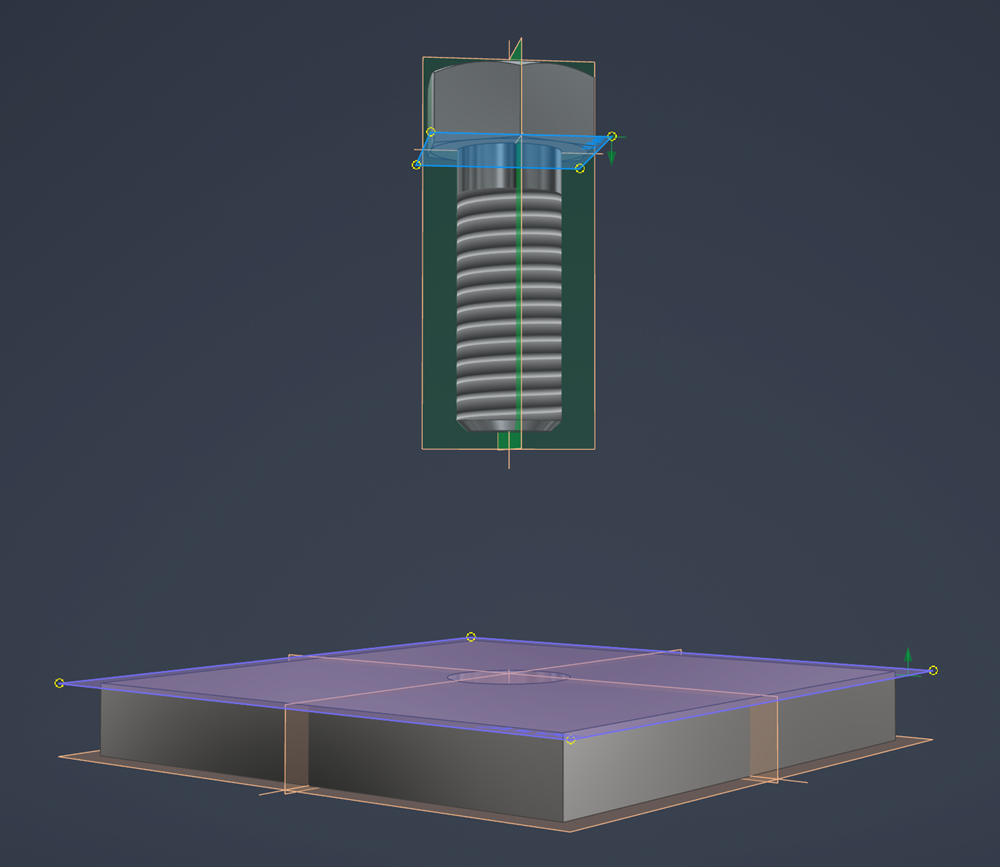
When a constraint is defined between work planes instead of faces, the constraints are much more stable when parts are modified. Faces can be modified, deleted, or recreated, but the work planes - and their entity IDs - remain the same. The constraint always resolves correctly because its components never changed.
That’s ETC in action. By anchoring relationships to geometry that is unlikely to change we build constraints that can absorb change without breaking.
Coupling
Coupling is the enemy of change.
David Thomas / Andrew Hunt, The Pragmatic Programmer
Coupling describes how much one part of a system depends on another. Coupling is highly desirable in some contexts. For example, when building a bridge, you want all parts to be tightly coupled so the pieces work together to provide strength and rigidity. But in software, where components are constantly changing and being replaced, we usually want to limit coupling so the whole system does not break when one thing changes.
Some coupling is unavoidable. Software components have to work together somehow. The goal is not to eliminate coupling entirely. The goal is to be intentional in design so we avoid making parts of the system depend on each other more than necessary.
Separation of concerns is one of the main ways we reduce tight coupling in practice. For more on that, see Separation of Concerns.
Framing Questions to Help You Use ETC
So how can we apply this to my everyday work? The easiest way is to ask yourself the question:
"Did my change just make the system easier or harder to change in the future?"
Ask yourself this often. When you write code, when you push a commit in GitHub, when you save a file. It applies to almost everything you do.
Another way to think about ETC is to ask whether what you just built is replaceable.
"Can I remove this component without the rest of the system falling apart?"
If the answer is yes, you’re probably moving in the right direction.
ETC won’t give you every answer, but it will consistently point you toward better long-term decisions. With ETC in mind, other development values and best practices take on a deeper meaning.